Philippines and Singapore accounts: upcoming HSBCnet payment and template screen changes
Starting between April and June 2025, we’ll be updating HSBCnet payment screens for domestic RTGS and international payments from accounts in the Philippines and Singapore to support enriched ISO 20022 payment data.
The enhanced payment screens will be introduced in phases. We expect to complete the rollout to all HSBCnet profiles with Philippines and Singapore accounts by the end of June 2025.
Here’s what’s changing in April 2025
Below are some of the changes you will notice in HSBCnet starting between April and June 2025.
- New and updated fields for payments and templates
In line with ISO 20022 standard, we’re introducing updated address fields and new regulatory fields for payments from accounts in the Philippines and Singapore as follows:
Payment fields Current address fields Payment details required Create payment or transfer
screen ❯ ‘Pay to’ sectionBeneficiary name* Beneficiary address
- Address line 1
- Address line 2
- Country or territory
Name*
(extended to support up to 140 characters)Town / city State / county Country / territory Additional address details * Indicates a mandatory field Here’s an example of what the new payment screens will look like in HSBCnet:
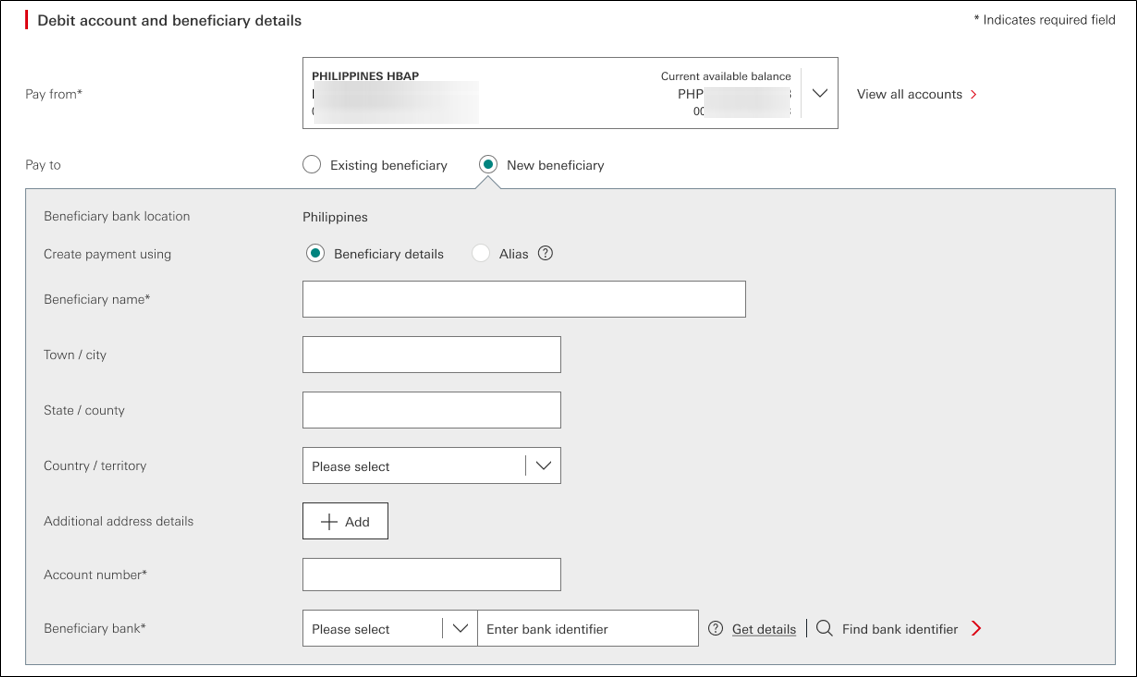
(select image to enlarge) - New Unique End-to-end Transaction Reference (UETR):
The UETR will be made available for domestic RTGS and international payments starting between April and June 2025.
A UETR is a string of 36 unique characters featured in all payment instruction messages carried over payment systems in the ISO 20022 standards. UETRs are designed to provide a single reference for a payment and provide transparency for all payment parties. You can track your payments or quote the UETR to our Client Services team when requesting payment investigation.
- Enhanced ‘Related reference’ field:
In line with ISO standards, the ‘Related reference’ field will support up to 35 characters.
What you need to do
To prepare for this change, we recommend that you review your domestic RTGS and international payments instructions as follows:
- Payment templates:
If you have any restricted or general templates already created, we recommend that you create a new template or modify existing templates as soon as the enhanced screen becomes available to help make sure you can continue to use your payment templates.
- Payments in ‘pending’ status:
If you have any domestic RTGS or international payments in ‘pending’ status, we recommend that you complete them before the new screens become available to avoid payment rejections. If you complete these pending payments after the effective date, the payment creator will need to populate information in the new fields before the payment can be authorised.
- Forward-dated payments:
If you have any forward-dated payments they will be submitted with the payment information that has already been entered. We recommend that you cancel and re-create these payment instructions once the enhanced screen is available.
Do you use the ‘Instruction to bank’ and/or ‘Instruction code’ fields in payments?
As payment infrastructures around the world continue to undergo modernisation, we’d like to remind you about some best practices to help make sure your payment instructions are sent successfully.
Using codewords in ‘Instruction to bank’ fields ❯
Using codewords in ‘Instruction code’ fields ❯
We’re here to help
To learn more about the new payment screens, please visit the ISO 20022 migration guide.
If you have any further questions or require additional assistance, please contact your HSBC representative.