Bank of England requirements effective 1 May 2025
Effective 1 May 2025, the Bank of England is implementing mandatory enhanced data requirements for CHAPS payments that meet certain criteria.
Here’s what’s changing in early 2025
In support of these upcoming UK CHAPS requirements, we’re introducing two new fields to HSBCnet payment screens. The enhanced payment screens will be introduced in phases starting in January 2025. We expect to complete the rollout to all HSBCnet profiles with UK accounts by the end of April 2025.
The new fields will be introduced for payments and templates as follows:
| New payment field | When to use the new field |
|---|---|
| Purpose of Payment |
Encouraged for all transactions Required by Bank of England for FI-to-FI transactions. Required by Bank of England for property transactions from May 2025. To find a list of UK Purpose of Payment codes, please refer to the Bank of England’s website. |
| Legal Entity Identifier (LEI) |
From May 2025, required by Bank of England for financial organisations that are regulated by the Prudential Regulation Authority (PRA) and authorised as deposit taking or broker dealers. If you are a financial organisation making payments on behalf of others, review the upcoming ISO 20022 requirements here: |
Here’s what the new Purpose of Payment field will look like:
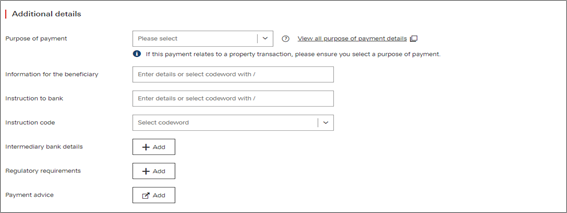
(select image to enlarge)
Here are the purpose codes for property transactions:
| Purpose code | Name | Description |
|---|---|---|
| HLRP | Property Loan Repayment | Transaction is related to a payment of a property loan. |
| HLST | Property Loan Settlement | Transaction is related to the settlement of a property loan. |
| PLDS | Property Loan Disbursement | Payment of funds from a lender as part of the issuance of a property loan. |
| PDEP | Property Deposit | Payment of the deposit required towards purchase of a property. |
| PCOM | Property Completion Payment | Final Payment to complete the purchase of property. |
| PLRF | Property Loan Refinancing | The transfer or extension of a property financing arrangement to a new deal or loan provider, without change of ownership of property. |
|
You can find the full list of purpose codes here: |
||
How to include purpose codes in your payment files:
| File format | Input field for purpose codes |
|---|---|
|
XML v2.0 XML v3.0 |
The purpose code <Purp> tag should be included in the <CdtTrfTxInf> (Credit Transfer Transaction Information) block, positioned immediately after the CdtrAcct structure. Below is the correct structure: <Purp> |
| iFile |
Second Party Detail. Regulatory Reporting Line 1/2/3 can be populated with following details. /PURP/GB-XXXX
|
|
Dynamic CSV |
Include the applicable code under the ‘Purpose Code’ column. |
|
MT103 |
:72:/PURP/XXXX |
Here’s an example of where you’ll find the new ‘Legal Entity Identifier’ field in HSBCnet:
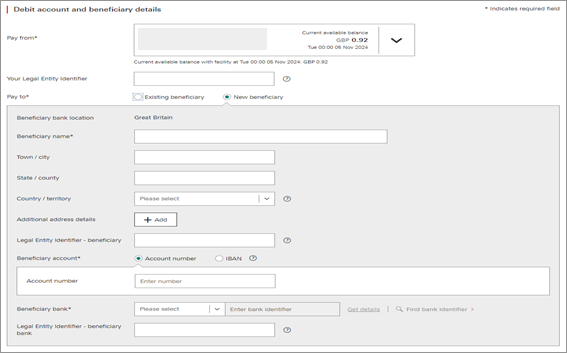
(select image to enlarge)
How to include Legal Entity Identifiers in your payment files:
| File format | Input field for Legal Entity Identifer |
|---|---|
|
XML v2.0 |
The LEI details can be provided for each applicable party tag and should be included in the <Id> (Party Identification) block. Below is the input structure for Creditor LEI: <Cdtr> |
| XML v3.0 |
The LEI details can be provided for each applicable party tag and should be included in the <Id> (Party Identification) block. Below is the input structure for Creditor LEI: <Cdtr> |
|
MT103 |
MT103 does not support LEI. Please use another format. |
Find out more
To learn more about the new payment screens, please visit the ISO 20022 migration guide.
Disclaimer: This article includes links to third-party, non-HSBC, websites. No member of the HSBC Group (as defined below and including but not limited to HSBC Bank plc) is responsible for the content or accuracy of any of these linked third-party websites, nor is the HSBC Group responsible or liable for any software downloaded from those websites. Please read the linked websites' terms and conditions. The HSBC Group has no control over non-HSBC Group websites and is not liable for your use of them or any information you obtain from them.
References to 'HSBC Group' in this disclaimer means HSBC Holdings plc and each of its subsidiaries, related bodies corporate, associated entities and undertakings and any of their branches.